Want a visible entity?
Start with Kenny, Hollow Steve, or Corner Entity. Match the loader exactly and test spawn behavior in a new world before adding another entity mod.
Open Kenny sourceJava 1.21.11 version guide
The best Minecraft horror mods 1.21.11 are chosen by compatibility before atmosphere. Match the exact loader, client/server role, release file, and source page, then test one project in a clean Java instance or copied world.
The project records below were checked through the official Mojang version manifest and Modrinth metadata on October 18, 2026. They are dated research notes, not a permanent latest-version promise. Re-open each official project page before installing.
External source pages open directly. Check the file type, edition, and version before downloading.

Start with the decision
For a current 1.21.11 Java shortlist, begin with Kenny [HORROR], Hollow Steve [HORROR], Server-Side Horror, Corner Entity [Horror], Vanilla But Wrong, and Presence (An Ambient Horror Mod). They cover different loaders and play roles, so a larger download or a scarier thumbnail is not enough to make one the right choice.
Kenny and Hollow Steve are flexible multi-loader entity choices. Server-Side Horror is the special case: Modrinth marks the client unsupported and the server required. Corner Entity and Vanilla But Wrong are Fabric paths, while Presence is a Forge ambient option. Start with the row that matches your installed loader instead of forcing a jar into a different profile.
This page is a version guide, not a file mirror. Use the official project page to re-check the live release, dependencies, loader, and changelog. A dated direct file is useful for auditability, but it is not a claim that the file stays latest or works on every 1.21.x release. For 1.21.1 or 1.21.4, use the existing version guides rather than mixing profiles.
Dated official metadata check
The table uses official Modrinth project and version records checked on October 18, 2026. File sizes are planning values, not a performance or safety score. The direct links point to version-specific Modrinth CDN records captured from project metadata; the project link remains the best place to confirm live requirements.
The release date matters because mod pages change. If a project now lists a newer compatible file, follow the live project page and do not treat this dated table as a permanent latest claim. If the loader or client/server label changes, rebuild the profile instead of mixing files from different records.
Match the scare to the profile
Kenny, Hollow Steve, and Corner Entity are entity-led choices: the tension comes from encounters, distance, and the way an ordinary survival loop becomes unsafe. Presence works better for players who want ambient pressure rather than a single named stalker. Vanilla But Wrong is a Fabric psychological option, while Server-Side Horror belongs in a separate server-led category.
For a group, check the client/server classification before you discuss scare style. A mod that starts in singleplayer can still fail on a dedicated server when dependencies, entities, or configuration are evaluated on the other side. Server-Side Horror is intentionally server-only in this snapshot, so a local launch cannot prove the multiplayer path.
Use the official Fabric installer or your Forge/NeoForge launcher for the profile, but let each Modrinth project page decide the dependencies and supported game versions. A loader name in a search result is not evidence that the same jar works everywhere.
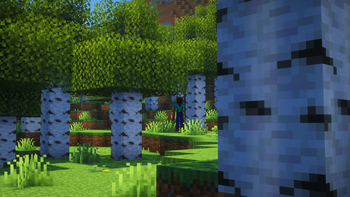
Start with Kenny, Hollow Steve, or Corner Entity. Match the loader exactly and test spawn behavior in a new world before adding another entity mod.
Open Kenny sourceInspect Presence for a Forge profile. It is a good small-variable test when you want sounds and atmosphere to matter before stacking extra entities.
Open Presence sourceInspect Server-Side Horror and follow its server-required classification. Do not judge a server-only project from a single-player launch.
Open server-side sourceClean setup workflow
Start with a separate Java instance or profile. Keep the main survival world, older 1.21.x profiles, and existing modpacks outside the first test. A clean baseline makes a missing dependency or loader mismatch easier to identify, while a copied world lets you remove the experiment without damaging a valuable save.
Before downloading, read the official project version list. Check the loader, game-version range, client/server classification, dependencies, file name, and publication date. If you use a versioned file link, keep the project page open so you can compare the live record with the file you actually saved.
Use the site's troubleshooting workflow for the same discipline: identify the edition, loader, version, dependency, and log evidence before changing files. Randomly replacing a jar hides the first mismatch and makes the next crash harder to diagnose.
Use a separate launcher instance and select Minecraft Java 1.21.11. Do not let the launcher silently update the profile to another release.
Choose Fabric, Forge, or NeoForge from the project's 1.21.11 record. A loader name in a search snippet is not enough; confirm the file's loader on the official project page.
If the project lists a library or API dependency, match that dependency to the same game version. Start with one horror project so the first launch has a clear cause if it fails.
Use the checked file only as a dated reference. Prefer the official project page, inspect the current release, and never rename a Java jar into a Bedrock addon.
Check launch, spawn behavior, sounds, first-night events, memory, and the latest log. Stop and roll back if the world behaves unexpectedly or the project conflicts with another system.
Record the Minecraft version, loader, project version, dependency list, and source URL. Only add another horror project after the first one works in isolation.
Client and server boundary
Some do, but the answer is project-specific. Kenny, Hollow Steve, Corner Entity, Vanilla But Wrong, and Presence require both sides in the checked project metadata. Server-Side Horror is the exception: the server is required and the client is unsupported. A single-player launch therefore cannot validate every multiplayer path.
For a dedicated server, test join, spawn, reconnect, restart, and a second player before inviting a full group. Share one frozen profile manifest instead of asking each player to collect files from different mirrors. When a project changes voice, communication, or shared state, explain the effect and the rollback plan before the session.
The separate Minecraft horror mods multiplayer guide owns the broader group-play intent. This page adds the 1.21.11 compatibility layer so the version table does not become a second multiplayer hub.

Version boundary and limits
Similarweb phrase data contains several 1.21.x variants. Treat 1.21.11 as a separate compatibility signal, not a formatting variant of 1.21.1 or 1.21.4. A Java jar belongs to the exact profile named by its project record. If your launcher reports another release, filter the official source page again before installing.
This page does not cover Bedrock `.mcaddon`, resource-pack, or behavior-pack installation. A Java `.jar` cannot be imported into Bedrock by renaming it, and a Bedrock addon cannot become a Forge, Fabric, or NeoForge mod by placing it in a mods folder. Use the site's Bedrock guide for that edition boundary.
The official Mojang manifest and Modrinth records were checked on October 18, 2026. Releases, dependencies, file sizes, and project status can change after that date. Use the project page as the current source, compare it with your profile, and keep a backup or copied world. Do not treat a dated table, video title, or mirror button as proof that a file is still correct.
Next pages
Use the older Java version guide when your Forge or Fabric profile is locked to 1.20.1.
Open the 1.20.1 guideFilter the broader Fabric horror list when your loader matters more than the 1.21.11 version boundary.
Open the Fabric guideUse the dedicated multiplayer guide for voice, server, client, and group-session decisions.
Open the multiplayer guideApply the edition, loader, dependency, and log-isolation process after a failed launch.
Open troubleshootingCompare broader Java and Bedrock horror directions before selecting a version-specific project.
Compare broad picksFAQ
There is no universal best pick. Kenny, Hollow Steve [HORROR], Server-Side Horror, Corner Entity [Horror], Vanilla But Wrong, and Presence (An Ambient Horror Mod) cover different scare styles and loader roles. Start with the project whose official 1.21.11 record matches your Fabric, Forge, or NeoForge profile, then test it alone.
Some can. Kenny has a checked Forge 1.21.11 file, while Hollow Steve [HORROR], Server-Side Horror, and Presence (An Ambient Horror Mod) are represented by NeoForge records in this dated check. Server-Side Horror also has Forge and other loader records. Always choose the exact loader file from the live project page instead of assuming that every horror mod supports Forge.
It depends on the project. The checked records mark most of this shortlist as client and server required, while Server-Side Horror is server-required and client-unsupported. Read the client/server classification, match dependencies, and test with two players before a full session.
No. A Java `.jar` is not a Bedrock `.mcaddon`, resource pack, or behavior pack. Renaming the file does not change its platform or loader. Use a Bedrock-specific source and the site's Bedrock guide when your game is Minecraft Bedrock.
No. Treat 1.21.11, 1.21.1, and 1.21.4 as separate game-version checks. Confirm the exact game-version filter on the official project page.
The links are version-specific Modrinth CDN records captured from official project metadata on October 18, 2026. Prefer the project page immediately before installation because releases and dependencies can change. If the direct file no longer matches the live record, use the official project page instead of a mirror or guessed URL.